
Scheduling
Pool Scheduling Software for Your Whole Team
See your entire week at a glance. Drag and drop to reschedule, set up recurring appointments, and track technicians in real time—all from one dashboard.
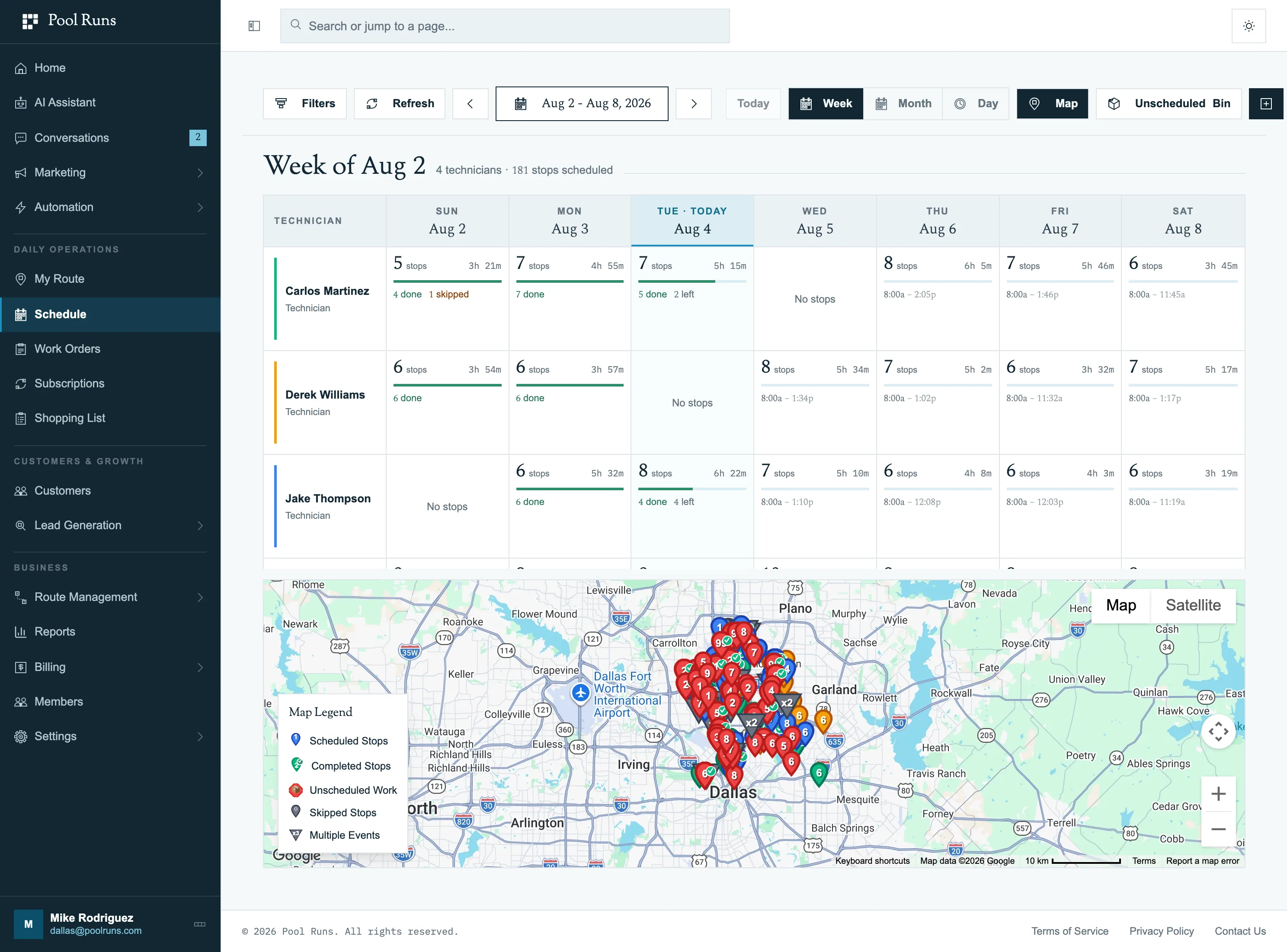
Three views
Different Ways to Manage Your Pool Service Schedule
Everyone thinks differently about their day. Pool Runs gives you calendar, map, and timeline views plus drag-and-drop rescheduling so you always have the perspective you need.
Recurring service
Recurring Pool Service Appointments on Autopilot
Set stops to repeat every one, two, three, or four weeks. Pool Runs generates scheduled route stops from those recurring assignments.
Set & Forget
Stops repeat every one, two, three, or four weeks
Auto-Generate
Scheduled route stops generated from recurring assignments
One-Click Changes
Skip or reschedule any single occurrence instantly
Sticky Assignments
Technician assignments persist unless changed or rescheduled
Job Bin
Plan Openings, Repairs and One-Off Jobs Weeks Ahead
Not every job is a weekly stop. Openings, closings, repairs and green-pool recoveries tend to live on a whiteboard until somebody finds a day for them. In Pool Runs they go into the Job Bin: every open work order that still needs a date or a technician, in one list.
Book the date first and decide who goes later. A job can sit on the calendar with no technician attached, keeps its date when you assign one, and stays visible on the calendar after a crew is on it, so the plan you made in spring is still the plan when the day arrives.
One List of Open Jobs
Every work order still waiting on a date or a technician
Date First, Crew Later
Book the day now and assign the technician when the week firms up
Find the Right Job
Search by customer, location or job type; filter by missing date or technician
Assign When Ready
Assigning a technician keeps the date you already booked
Month view
See the Whole Month, Technician by Technician
The monthly calendar's Jobs and tasks view puts route progress and dated work in one place. See route progress by technician, alongside short work-order and task labels in technician colors, so you can compare the work planned for each day.
Hover over or click a day to see every technician side by side: their recurring stops, their jobs color-coded by work order type, and the team total at the top. In the week view, hovering a technician's day previews that day's stops in route order, with the time, the city, whether each stop is weekly, a one-off or a specific job, and which are done, skipped or in progress.
Trusted by Pool Service Professionals
See how pool service companies are saving time with Pool Runs scheduling.
“We used to spend every Sunday night building the week’s schedule in a spreadsheet. With Pool Runs, our recurring routes are set up once and the work orders generate automatically. I’ve gotten my Sundays back.”

“When a customer calls to reschedule, I just drag the stop to a new day and my tech sees it instantly. No more calling or texting back and forth. Pool Runs made our scheduling seamless.”

Questions
Pool Scheduling Software FAQ
Explore More Pool Runs Features
Scheduling is just the beginning. See how Pool Runs helps you run your entire operation.
Get started
Ready to Simplify Your Scheduling?
Set your recurring routes up once and stop rebuilding the week every Sunday night. Start your free trial today.